
GPT Image 2.6: Flare vs Sunburst, GIFs, SVGs and what an image really costs
OpenAI's new image model animates GIFs, exports SVG files, takes marked-up edits and sits at the top of the independent image leaderboard. We ran our own tests on both versions, Flare and Sunburst. The upgrades are real, and so is the catch: at the same settings, an image now costs about three to four times as much.
By Justin Pinter, Monolith

Picture a neighborhood bakery getting ready for the holidays. It needs a poster for the window, a looping mascot for Instagram and a clean logo file the printer won't complain about. A year ago that was three different tools and probably a designer's afternoon. OpenAI's latest image model can now draft all three from a sentence each. Whether it should is a different question, and the answer depends mostly on which version you pick and what you are paying per image.
OpenAI released Images 2.6 on November 4, 2026, in ChatGPT, Codex and its API. In ChatGPT and Codex it is available across all subscription tiers on desktop, mobile and web. Developers get two versions to choose from: GPT Image 2.6 Flare, built for fast iteration, and GPT Image 2.6 Sunburst, built for detailed work and steadier edits. OpenAI says people now create 4 billion images a week across its products. 1
What's new in GPT Image 2.6
There are five real changes, and two of them are new kinds of output rather than better pictures. GIF animation and SVG export mean the model can now hand you a moving file or an editable vector, not only a flat image. The other three are about control: drawing on an image to show where an edit goes, telling the model how much planning a request deserves, and simply getting results back faster. 12
| Feature | What it does | Details that matter |
|---|---|---|
| Animated GIFs | Turns a prompt, or a still you upload, into a looping animation | 2 to 16 frames, 20 to 2,000 ms per frame, in ChatGPT and the API |
| SVG export | Returns an editable vector file instead of pixels | API only, one image per request, static paths with no embedded images |
| Image markup | Circle or sketch on a copy of the image to show where to change it | Already in ChatGPT, now in the API; no extra fee |
| Complexity control | Sets how much the model plans before drawing | Low, medium or high; high by default; no extra fee |
| Speed | Faster generation across the board | OpenAI says 50% faster; Flare can finish in about 6 seconds at low quality |
| Flare and Sunburst | Two versions at the same price | Flare for fast drafts and layouts, Sunburst for detail and consistent edits |
Complexity is the least flashy addition and probably the most useful. Quality controls how much detail goes into the pixels. Complexity controls how much thinking goes into the scene: where the objects go, how the text fits, which details relate to which. OpenAI recommends low complexity for quick edits such as changing a background or a sign, and medium or high for crowded layouts. It also warns that higher complexity can add time and introduce changes you did not ask for, so it is worth comparing on your own work. 12
Flare or Sunburst: which one to use
Both versions cost the same per token, support the same features and work through the same API endpoints. The difference is what each is tuned for. OpenAI describes Flare as the model for fast iteration and says it also improves layout quality for posters, product imagery and other professional visuals. Sunburst brings higher-quality images and more consistency across rounds of edits at medium or high quality, which matters when a character, product or brand detail has to look the same in version five as it did in version one. 12
| Use Flare when | Use Sunburst when |
|---|---|
| You are exploring ideas and want many options fast | You have picked a direction and are polishing the final image |
| The job is a poster, flyer or simple product layout | The job is a detailed scene, a portrait or a product close-up |
| You are making social posts in volume | You are editing the same image over several rounds |
| Speed matters more than fine detail | A logo, label or face must stay exactly the same between edits |
We tested it: the same poster, four ways
Claims are one thing, so we ran our own test on November 9. We asked for the same event poster four times: a holiday flyer for a made-up bakery called Field & Flour, with a headline, a date and time, three short lines of copy and an address. Text inside images has been the classic weak spot of AI image models, so we counted every word. We ran GPT Image 2.5 Sunburst for comparison, then GPT Image 2.6 Flare at low and medium quality and GPT Image 2.6 Sunburst at medium.
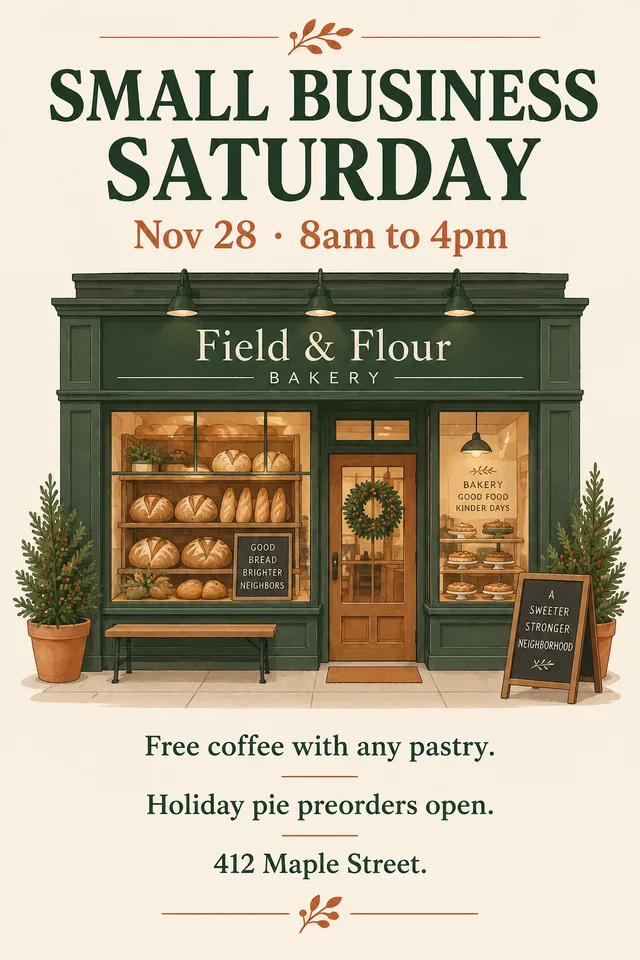 2.5 Sunburst · medium
- Cost
- 1.1¢
- Tokens
- 343
- Typos
- 0
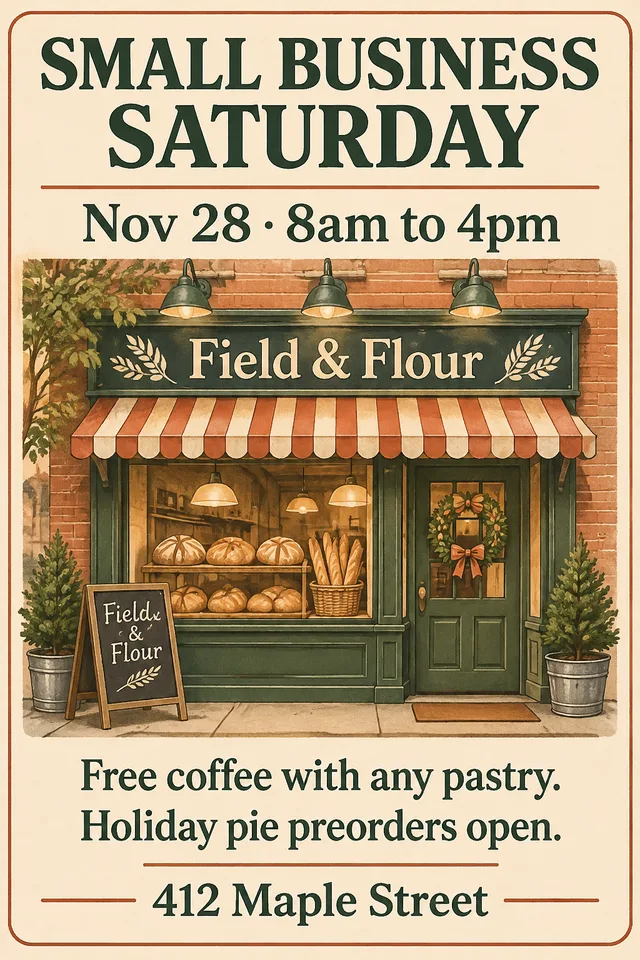 2.6 Flare · lowPick
- Cost
- 2.0¢
- Tokens
- 664
- Typos
- 0
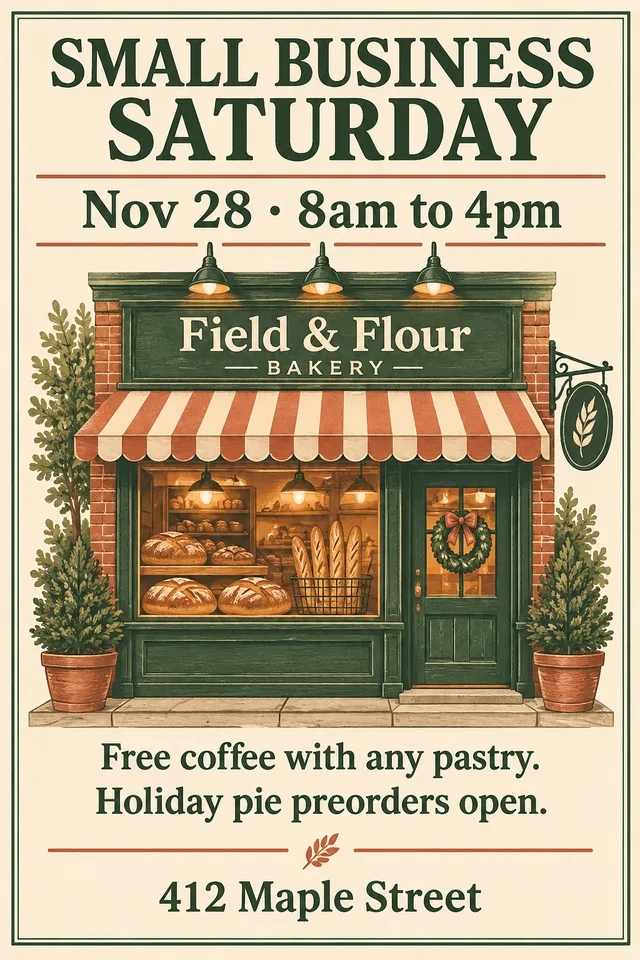 2.6 Flare · medium
- Cost
- 3.4¢
- Tokens
- 1,132
- Typos
- 0
 2.6 Sunburst · medium
- Cost
- 3.4¢
- Tokens
- 1,132
- Typos
- 0
The good news first: every poster spelled every line correctly, in both runs of each setting. The 2.6 posters were better designed. They set the bottom lines larger and bolder so the offer and the address read from across a room, where 2.5 Sunburst kept them small and light. 2.5 also invented extra text we didn't ask for, such as little slogans on a chalkboard and in the window. Sunburst 2.6 went furthest, putting the date on a ribbon banner and filling the window with pies to match the copy about holiday pie preorders. Our pick for a real shop window would be the cheapest 2.6 version, Flare at low quality, which looked finished at 2 cents.
The catch: same price per token, more tokens per image
OpenAI charges for images by the token, and Images 2.6 costs the same per token as 2.5: $30 per million image output tokens. But each 2.6 image is made of far more tokens at the same quality setting. OpenAI's own guide says it plainly: equal token rates don't mean equal cost per image. In our runs, a 2.6 image cost about three to four times as much as the same request on 2.5. 2
In absolute terms these are still small numbers. A month of social posts, 100 images at medium quality, comes to about $4. The jump matters at volume: a store generating 10,000 product images moves from roughly $130 to $440 at medium quality. It also matters for anyone who set a budget on 2.5 and is about to switch, because the bill will not look the same even though the price list does.
| Quality | 1024×1024 | 1536×1024 | 3840×2160 (4K) |
|---|---|---|---|
| Low | 2.5¢ | 2.0¢ | 4.7¢ |
| Medium | 4.3¢ | 3.4¢ | 8.6¢ |
| High | 5.3¢ | 4.1¢ | 10.0¢ |
| Extra high | 9.4¢ | 7.4¢ | 17.8¢ |
| Max | 21.1¢ | 16.5¢ | 40.0¢ |
Two quirks in that table are worth knowing. A wide 1536×1024 image costs a little less than a square one at the same quality, because the model uses fewer tokens for it. And the jump from extra high to max more than doubles the price, for a difference most people would struggle to see on a phone. Medium is the sensible default for marketing work. 2
Is it actually faster?
OpenAI says Images 2.6 generates images 50% faster than before, and that Flare can finish in as little as six seconds at low quality. We timed the same 1024×1024 product shot three times on each setting, one request at a time. Flare held up its end: 2.6 Flare at low quality finished in a median of 7.8 seconds, against 11.4 seconds for 2.5 Flare, roughly the gain OpenAI describes. 1
Sunburst went the other way. At medium quality, 2.6 Sunburst took a median of 28.9 seconds, slower than 2.5 Sunburst's 16.7, and one run took nearly a minute. It was also drawing more than three times as many tokens per image, so the extra time buys extra detail. Three runs through one gateway on one morning is a small sample, and timing depends on how busy the service is. But the pattern suggests a simple rule: the speed gain is mostly a Flare story.
GIFs: a mascot that waves, in about 6 cents
GIFs are the feature most small businesses will actually notice. OpenAI pitches them for animating a brand mascot, making reactions and memes for social media, or sketching how a character should move before paying for video. In the API you set the number of frames and how long each one shows, and you can upload still images to guide the animation. 12
 2.6 Flare · GIFPick
- Frames
- 9
- Cost
- 6.3¢
- Time
- 10.9 s
 2.6 Sunburst · GIF
- Frames
- 9
- Cost
- 6.3¢
- Time
- 25.4 s


Both loops worked on the first try. Each one waved, winked and returned to its starting pose, so the GIF repeats without a jump, and the character stayed on model from frame to frame, which is the hard part. Sunburst drew a more realistic sourdough loaf; Flare drew a friendlier cartoon and finished in less than half the time. Each cost the same 6.3 cents. For a social post or a website accent, that is a very cheap way to add motion. For anything longer than a couple of seconds you still want a video model.
Ready for real motion rather than a loop? Our guide breaks down what an AI video actually costs to make, beyond the generation fee.
SVGs and markup: the two features for designers
SVG export is the feature designers will argue about. Ask for an SVG and the model first draws a normal image, then writes vector code that traces it, so you pay for both steps. What comes back is a static file of shapes and colors with no scripts and no embedded pictures, which means you can open it in Illustrator or Figma and change a color or nudge a curve. That is genuinely handy for icons and simple illustrations. It is a starting point for a logo, not a logo: a real mark still needs a designer to clean the paths, check it at small sizes and make sure it doesn't look like someone else's. SVG is only available in OpenAI's own API, and when we tried it through a third-party gateway it wasn't offered. 2
Markup is the opposite: unglamorous and immediately useful. You circle the vase you want recolored or scribble over the sign you want changed, send that as a separate transparent layer and describe the edit. The model changes what you marked and leaves the rest alone. Anyone who has tried to describe "the second shelf from the left, behind the plant" in words will see the appeal. Marked-up edits cost the same as any other edit. 12

How it ranks against other image models
Independent testing backs up the quality claims. On Artificial Analysis's text-to-image leaderboard, where people vote blind between two images made from the same prompt, GPT Image 2.6 Sunburst is now first with an Elo score of 1259. GPT Image 2.6 Flare scores 1228, statistically tied with last month's leader, GPT Image 2.5 Sunburst, at 1227. Google's Nano Banana 2.1 is the best non-OpenAI model at 1176. 4
Read the chart with one caveat. Artificial Analysis tests OpenAI's models at max quality, which costs about 21 cents per square image, while Nano Banana 2.1 runs at about 3.4 cents and Meta's Muse Image at 1 cent. Our own tests suggest 2.6 at medium quality is good enough for most marketing work at a fifth of the max price, but the leaderboard doesn't score that setting, so the top ranking is for the top setting. If you need the best-looking single image, 2.6 Sunburst is it. If you need thousands of good images, the cheaper models in the middle of the chart are worth a test first. 4
Comparing image tools for your team? Our Krea 3 guide covers fast, cheap editing, and our FLUX 3 guide covers precise layouts.
Using an older OpenAI image model? Plan the switch
If your website, app or automation calls an older OpenAI image model, check the date. OpenAI will shut down gpt-image-1.5, gpt-image-1-mini and chatgpt-image-latest on December 1, 2026, and names the two 2.6 models as the replacements. The original gpt-image-1 already stopped working on October 23. Switching is mostly a one-line change to the model name, but test your prompts, and budget for the higher cost per image. 3
- Oct 23, 2026gpt-image-1 shuts downRetiredOpenAI's first GPT Image model stops working; OpenAI points users to GPT Image 2.5.
- Nov 4, 2026Images 2.6 launchesReleasedFlare and Sunburst arrive in ChatGPT, Codex and the API with GIFs, SVGs, markup and complexity control.
- NowTest and switchThis monthRun your real prompts on 2.6 Flare and Sunburst, compare quality and cost, then update the model name.
- Dec 1, 2026Older models shut downDeadlinegpt-image-1.5, gpt-image-1-mini and chatgpt-image-latest stop working; OpenAI names 2.6 as the replacement.
Where it fits for a small business
For most owners, the place to use Images 2.6 is ChatGPT, where it is already part of your plan and the cost per image doesn't show up as a bill. The API matters when you are generating images in volume or building them into a website, store or app. Either way, these are the jobs where it earns its keep today:
- Event posters, flyers and sale signs, where the 2.6 layouts and reliable text save a round with a designer.
- Looping GIFs of a mascot, product or logo for social posts, email headers and website accents.
- Product scenes and seasonal variations, using Sunburst when the product has to look identical across a set.
- Quick, precise fixes to an existing image with markup, such as a new sign, a recolored item or a removed object.
- Icon sets and simple illustrations as SVGs that a designer can finish, not a final logo.
The usual rules still apply. Read every word in an image before it goes on a window or a box, because zero typos in our test is not a promise. Keep your brand colors and fonts in the prompt so every image starts from the same place. And treat the leaderboard as a guide to quality, not value: the right setting is the cheapest one that looks good enough for where the image will appear.
Monolith's take: GPT Image 2.6 is the best image model you can use today, and its GIF, SVG and markup features make it more useful than its predecessor for everyday marketing work. Default to Flare at low or medium quality: it is fast, its layouts are strong and its text was flawless in our tests. Save Sunburst for hero images and multi-round edits. And re-check your budget before switching, because the same settings now cost three to four times as much per image.
What is the difference between GPT Image 2.6 Flare and Sunburst?
How much does GPT Image 2.6 cost per image?
Can GPT Image 2.6 make GIFs and SVG files?
Read for this feature. The numbers match the markers in the text.
- OpenAI: Introducing Images 2.6 (November 4, 2026)openai.com
- OpenAI API documentation: Image generation guidedevelopers.openai.com
- OpenAI API documentation: Deprecationsdevelopers.openai.com
- Artificial Analysis: Text-to-image leaderboard (AA-Image-T2I v2.1)artificialanalysis.ai
Want image and motion work that looks like your brand, built with the right model for each job? That's what our creative production work covers.
Want to apply this to a project? Here is the related service.
25 AI instructions to try on everyday work
Prompts are instructions you give an AI tool. This PDF includes 25 examples for inquiries, marketing and admin. Adapt them to your task and check the results.